हर धागा, एक जगह
✳ Software for furnishing & handloom businesses

Your workshop.
Woven together.

Orders, tailors, measurements, attendance, dues — every thread of your shop, running through one simple app.

आपकी दुकान का पूरा हिसाब — एक ही जगह, एक ही ऐप में।

No credit card required
Setup in 2 minutes

Manage Orders

Track every order from start to finish

Measurements

Store & reuse measurements

Attendance

Keep your team in sync

Dues & Payments

Track dues and payments easily
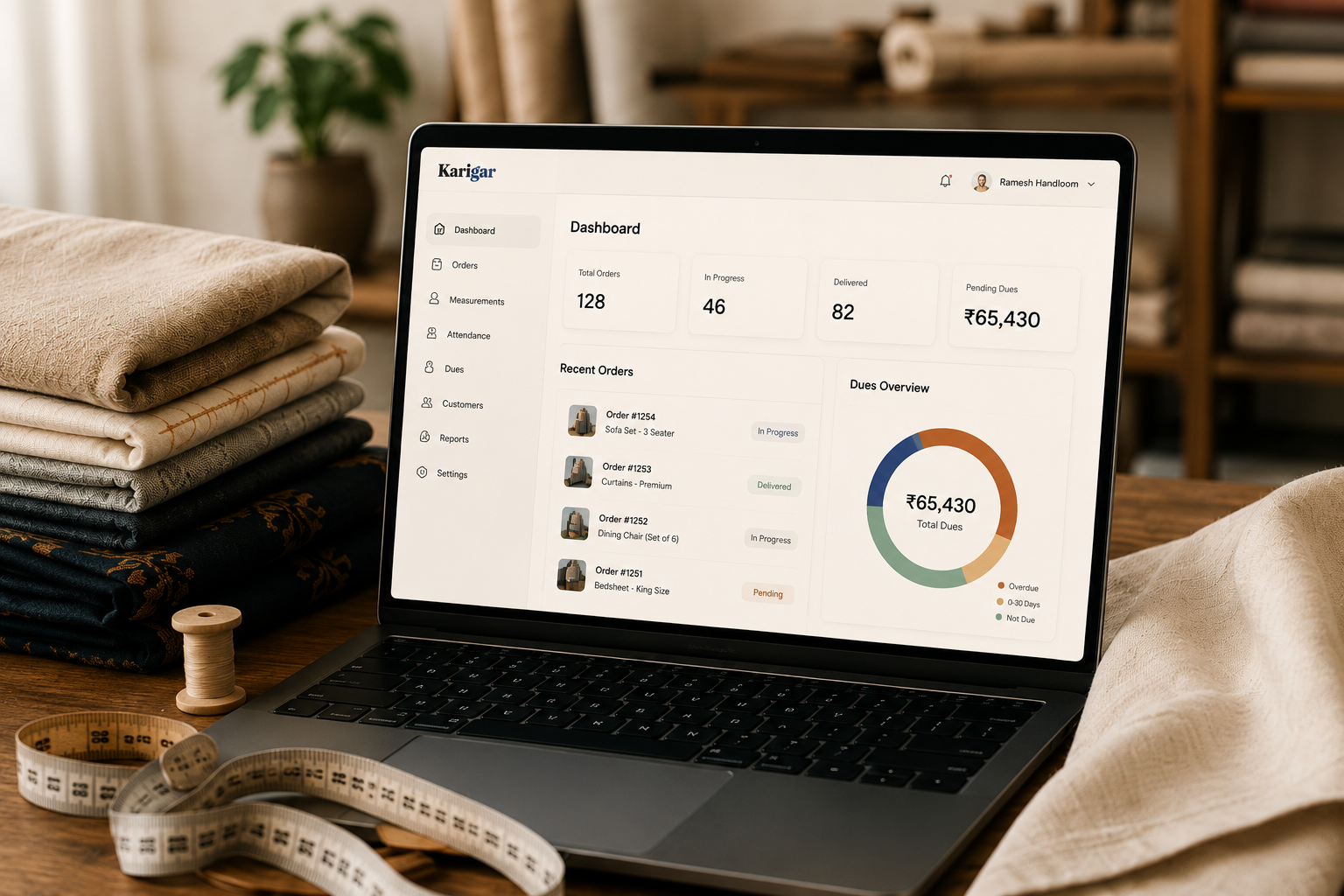
Karigar dashboard on laptop
CurtainsSofa CoversBlindsWallpaperMosquito NetsHeadboardsCarpet PastingMattress CuttingSofa Repairing CurtainsSofa CoversBlindsWallpaperMosquito NetsHeadboardsCarpet PastingMattress CuttingSofa Repairing
MeasurementCuttingTailoringIroningDeliveryAttendanceDuesReportsInvoices MeasurementCuttingTailoringIroningDeliveryAttendanceDuesReportsInvoices
The problem, plainly · समस्या, सीधी बात में

डायरी में ऑर्डर, फ़ोन पर तगादा, हिसाब सिर में।

One person falls sick, and the whole shop slows down. It doesn't have to work this way.

01
03
01 — JOB TRACKING

Every order, every stage, one glance.

From "New Order" to "Delivered" — each job type gets its own pipeline. Curtains flow through measurement, cutting, tailoring, ironing. Tap a step, status updates, everyone knows.

02 — ATTENDANCE & TEAM

Haaziri without the register.

Mark present, half-day, absent in one tap. Monthly totals compute themselves. Staff join with a simple invite code — no emails to teach, no passwords to reset for them.

03 — DUES & INSIGHTS

Know who owes, and how business is really going.

Outstanding balances by customer. Jobs by firm, by status, by urgency. The numbers you currently keep in your head — visible, safe, and shareable with the people you choose.

Learn how to use Karigar → पूरी जानकारी हिंदी में भी
Jobs
Sharma Ji
Curtains · Tuntun
Tailoring
Verma Interiors
Sofa Cover · Guddu
Cutting
Gupta Niwas
Blinds · Ajay
Ready
Dr. Khan
Wallpaper · Tuntun
Urgent
Hotel Ashoka
Curtains ×12 · Guddu
Measurement
Attendance · July
P
P
H
P
A
P
S
P
P
P
P
H
P
S
Tuntun · days worked18.5
Dues
Total outstanding₹1.24L
Hotel Ashoka
Nandwani Handloom
₹48,000
Verma Interiors
Interio
₹31,500
Dr. Khan
Home Glow
₹12,200
From payment to daily use · पैसे देने से रोज़ इस्तेमाल तक

Running in under an hour.

01

Pick a plan, pay by UPI. प्लान चुनें, UPI से पे करें

Choose your tier below, tell us about your shop, and pay through a secure Razorpay link — UPI, card, or netbanking. No demos, no sales calls.

₹ UPI · Card · Netbanking
02

Get your License ID. लाइसेंस ID मिलेगा

Within minutes, your License ID arrives on WhatsApp. Open the app, choose "Set up organisation", enter the ID — and you're the owner.

KGR-XXXX-XXXX
03

Staff join with one code. स्टाफ कोड से जुड़ेंगे

Share your invite code. Your accountant, salesmen, and managers sign up in thirty seconds; you approve each one. Tailors don't even need accounts.

Invite code · You approve
04

Run the shop. We keep the thread. बाकी हम संभालेंगे

Add jobs, mark attendance, track dues — from the counter or the road. Renew monthly by UPI; miss a month and your data waits safely, exactly as you left it.

Data always yours
Simple pricing · आसान कीमत

Pay for what you run.

Single Firm
₹1,899
per month
  • 1 firm
  • Up to 20 staff accounts
  • Unlimited jobs & job types
  • Attendance, dues, reports
  • WhatsApp support
Start free trial
Most popular
Up to 5 Firms
₹3,599
per month
  • Up to 5 firms, one dashboard
  • Up to 100 staff accounts
  • Unlimited jobs & job types
  • Attendance, dues, reports
  • Priority WhatsApp support
  • Custom job pipelines per firm
Start free trial
5+ Firms
Let's talk
custom pricing
  • Unlimited firms
  • Custom staff limits
  • Onboarding done for you
  • Direct line to the founder
  • Custom features negotiable
Contact us

14-day free trial on every plan · No card needed to start · Cancel anytime, your data stays exportable

Start your trial. ट्रायल शुरू करें।

Tell us about your shop — we'll reply on WhatsApp within the hour with your trial access.

Opens WhatsApp with your details pre-filled — send it and we take it from there.
कारीगर · कारीगर · कारीगर
Help Center · मदद केंद्र

See exactly where to tap.

कहां टैप करना है, तस्वीरों में देखें।
01

Getting Started

पहली बार लॉगिन कैसे करें

You've paid and received your License ID on WhatsApp. This is the only time you'll need it.

Karigar
owner@shop.com
••••••••
Sign In
New here? Set up organisation👆 यहां टैप करें
Tap once
Set up organisation
KGR-8M2K-PQ4X
owner@shop.com
••••••••
Create Account
ध्यान दें: License ID वही व्यक्ति डालेगा जो शॉप का मालिक (Owner) है — पहली बार में ही यह तय हो जाता है, बाद में बदला नहीं जा सकता। ID किसी और को न दें।
02

Managing Jobs

नया ऑर्डर कैसे जोड़ें और आगे बढ़ाएं

Every order — curtains, sofa covers, blinds — is a "Job". Each moves through stages until delivered.

DashboardJobsDues
U
Jobs
+ New Job👆 यहां टैप करें
Sharma Ji
Curtains
Fill & save
New Job
Sharma Ji
Nandwani Handloom
15 Aug 2026
Save Job
Sharma Ji — Curtains
✓ MeasurementCuttingTailoringIroningDelivered
हर स्टेप पर टैप करने से आगे बढ़ता है
Status updates
Sharma Ji
Cutting
बोर्ड पर तुरंत दिख जाता है — सबको पता चलता है
03

Attendance

हाज़िरी कैसे मार्क करें

No more paper register. Mark daily attendance in one tap, from phone or shop computer.

DashboardJobsReports
Reports → Attendance 👆 यहां जाएं
Tap a box
Attendance · July
P
P
H
P
A
P
S
हर टैप से P → H → A बदलता है
Tip · सलाह: रविवार (S) अपने आप लग जाता है — इसे मार्क करने की ज़रूरत नहीं। महीने के अंत में कुल दिन अपने आप जुड़ जाते हैं — तनख़्वाह निकालने के लिए तैयार।
04

Dues & Reports

बकाया पैसा और रिपोर्ट कैसे देखें
JobsScheduleDues👆 यहां टैप करें
U
Tap "Dues" in the top menu
See totals
Total outstanding
₹1.24L
Hotel Ashoka
₹48,000
Reports → Insights में आपको हर फर्म और हर स्टेटस के हिसाब से जॉब्स की गिनती भी दिखती है — कहां काम ज़्यादा अटका है, एक नज़र में पता चलता है।
05

Firms & Job Types

अपनी फर्म और प्रोडक्ट सेट करें

Only the Owner sees Settings. If you run more than one firm (like Handloom, Interio, Home Glow), each can have its own products.

DashboardJobs
👆 सेटिंग्स
Your Firms
Nandwani Handloom
Nandwani Interio
Tick products
Deals in
ध्यान दें: यहां आप हर Job Type के स्टेप्स भी बदल सकते हैं (जैसे "Measurement → Cutting → Delivered") — अपनी दुकान के हिसाब से।
06

Team & Roles

स्टाफ कैसे जोड़ें और अनुमति दें
Invite Code
SH-7241
यह कोड स्टाफ को WhatsApp पर भेजें
They join, you approve
Pending Approval (1)
Vinod
Approve
चार तरह के रोल: Owner — सब कुछ देख सकता है (सिर्फ एक)। Admin — लगभग सब कुछ, स्टाफ भी जोड़ सकता है। Employee (Full) — जॉब्स जोड़ें/बदलें। Employee (Viewer) — सिर्फ देख सकता है, बदल नहीं सकता।
07

Billing & Renewal

भुगतान और नवीनीकरण कैसे काम करता है
📱
हर महीने WhatsApp पर पेमेंट लिंक आता है — UPI से पे करें, 2 मिनट का काम।
Auto-extends
पेमेंट होते ही आपका license अगले महीने तक बढ़ जाता है — कुछ और करने की ज़रूरत नहीं।
अगर पेमेंट मिस हो जाए तो? · What if you miss a payment?
आपका डेटा पूरी तरह सुरक्षित रहता है — कुछ भी डिलीट नहीं होता। बस ऐप तब तक लॉक हो जाता है जब तक आप रिन्यू नहीं करते। रिन्यू करते ही सब कुछ वैसा ही मिलता है जैसा छोड़ा था।
08

FAQ · अक्सर पूछे जाने वाले सवाल

पासवर्ड भूल गए तो? · Forgot your password?
इनवॉइस पर दिए नंबर पर WhatsApp करें — एक घंटे के अंदर मदद मिलेगी।
बाद में स्टाफ जोड़ सकते हैं? · Can I add staff later?
जी हां, कभी भी। Settings में अपना invite code देखें और जो जुड़े उसे अनुमति दें।
क्या दर्ज़ी भी ऐप चला सकते हैं? · Can tailors use the app?
दर्ज़ी को अपना लॉगिन नहीं चाहिए — उनका काम Jobs बोर्ड से ट्रैक होता है।
क्या मेरा डेटा सुरक्षित है? · Is my data safe?
हां। हर दुकान का डेटा पूरी तरह अलग और निजी है — कोई दूसरी दुकान इसे कभी नहीं देख सकती।
प्लान बदल सकते हैं? · Can I change my plan?
हां, कभी भी अपग्रेड करें — बस हमें WhatsApp पर बताएं, अगले बिल से नया प्लान लागू हो जाएगा।
Still stuck? · अटक गए? WhatsApp us anytime — a real person replies. Message us →